A robot that has just been switched on in a warehouse has one basic question to answer before it can do anything useful: how do I get from here to there? Breadth first search (BFS) is the simplest algorithm that answers it properly. It is the first path planner most roboticists learn, and it sits underneath the two famous algorithms that come after it, Dijkstra and A*.
This guide explains BFS from the ground up. We start with the idea in plain words, walk through each part of the algorithm, show why it always finds the path with the fewest steps, and then run it in Python on a small robot map. That same map comes back in the next two posts of this series, on Dijkstra’s algorithm and A* search, so you can compare all three on equal terms.
What is breadth first search?
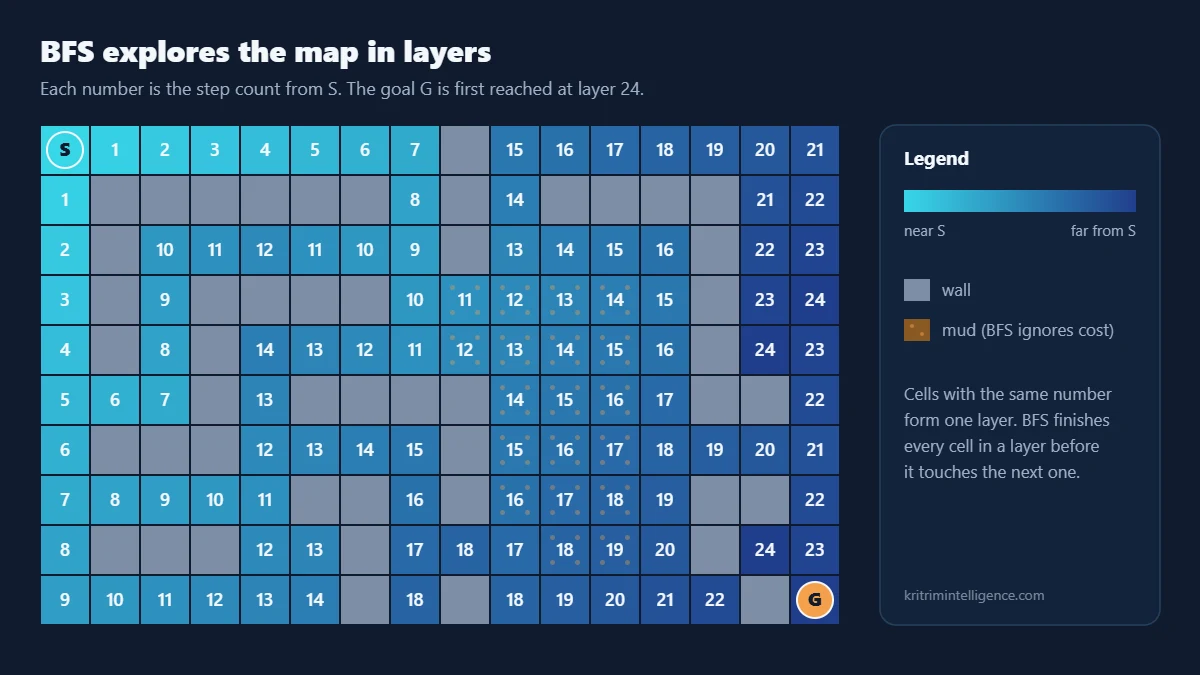
Breadth first search is a way of exploring a graph one layer at a time. It starts at one node, visits every node one step away, then every node two steps away, then three, and so on. It keeps going until it reaches the goal or runs out of places to look.
A graph here is just a set of places (nodes) and connections between them (edges). For a mobile robot, the easiest graph to picture is a grid map. Each free cell of the floor is a node, and two cells are connected when the robot can move straight from one to the other.
A good way to picture BFS is a drop of ink landing on paper. The stain spreads outward evenly in every direction it is allowed to go. The first time the edge of the stain touches the goal, you know the goal is as close as it could possibly be, in steps.
How BFS works, step by step
BFS needs only three pieces of bookkeeping: a queue, a record of what it has already seen, and a note of how it reached each cell.
The queue
The queue holds cells that have been discovered but not yet looked at. It works first in, first out, like a line at a ticket counter. New cells join at the back, and BFS always takes the next cell from the front.
That one rule is what gives BFS its shape. Every cell one step from the start joins the queue before any cell two steps away, so the search can never skip ahead to a far layer before it has finished the near one.
The visited set
Without a memory of where it has been, BFS would bounce between two neighbouring cells forever. So each cell is marked as visited the moment it is added to the queue. A cell that is already marked is never added again.
Marking a cell when it is added, not when it is taken out, matters. It stops the same cell from sitting in the queue twice, which keeps the memory use small and the result correct.
Walking back along the parent links
When BFS discovers a new cell, it writes down which cell it came from. This is the cell’s parent. Once the goal is reached, you follow the parent links backwards: goal, then its parent, then that cell’s parent, all the way to the start. Reverse that list and you have the path.
Put together, the whole algorithm is short:
- Put the start cell in the queue and mark it visited.
- Take the cell at the front of the queue.
- If it is the goal, follow the parent links back and stop.
- Otherwise, for each open neighbour that has not been visited, mark it, record its parent and add it to the back of the queue.
- Repeat from step 2 until the queue is empty. An empty queue means there is no path.
Why BFS finds the shortest path
BFS gives a promise that is easy to state and easy to trust: the first time it reaches the goal, it has found a path with the fewest possible steps.
The reason comes from the order of the queue. Let d(v) be the number of steps from the start to cell v. When BFS takes a cell u from the queue and discovers a new neighbour v, it sets
The queue only ever holds cells from at most two neighbouring layers, d and d + 1, with every layer d cell ahead of every layer d + 1 cell. So BFS finishes all cells at distance 0 before distance 1, all of distance 1 before distance 2, and so on. If the goal were reachable in fewer steps, BFS would have met it in an earlier layer. That is the whole proof.
Notice the word steps. BFS treats every move as equally expensive. That detail turns out to matter a great deal, and we will see why with real numbers below.
Running time and memory
Each cell enters the queue at most once and leaves it at most once. For each cell taken out, BFS checks its neighbours, so across the whole run every edge is looked at a fixed number of times. With V nodes and E edges, the running time is
On a grid where each cell has at most four neighbours, E is at most about 4V, so BFS runs in time proportional to the number of cells. Memory grows in proportion to V as well, for the visited set, the parent links and the queue.
This is as fast as any search that might need to look at the whole map. It is the main reason BFS is still used on small grids, inside games and on microcontrollers where a simple, predictable algorithm is worth more than a clever one.
Python example: BFS on a robot grid map
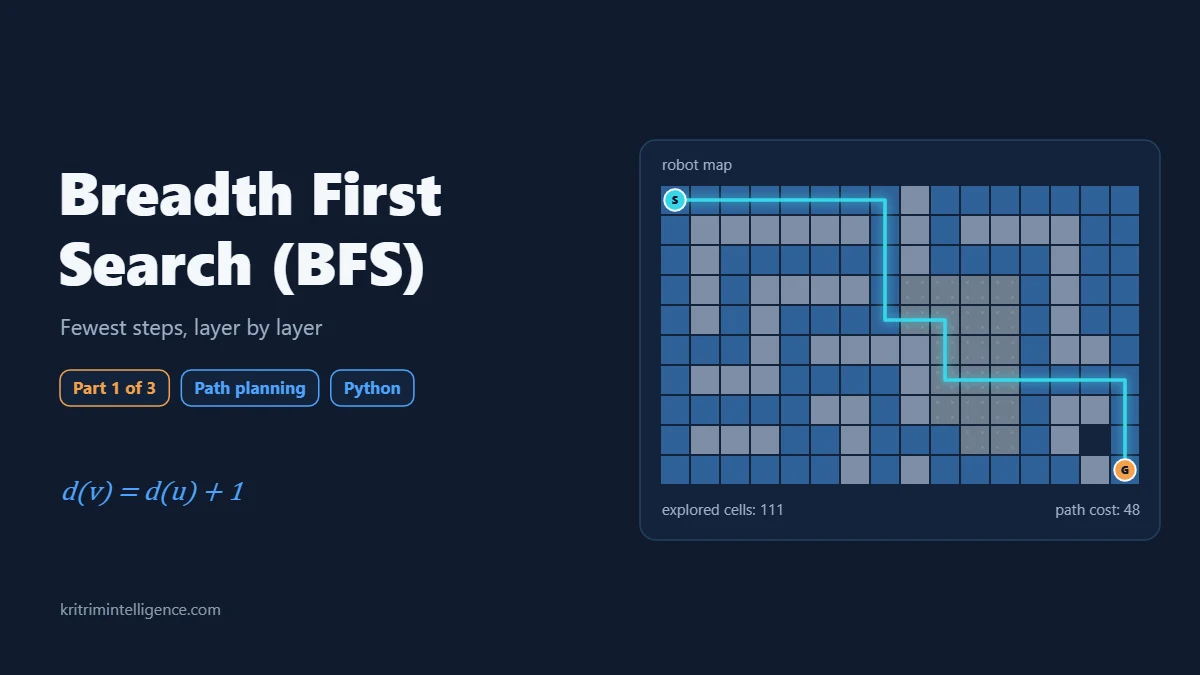
Here is the map we will use in all three posts. S is the robot, G is the goal, # is a wall, ~ is a patch of mud that is slow to drive through, and . is open floor. The robot can move up, down, left or right, one cell at a time.
The map and helper functions
This part is shared by the BFS, Dijkstra and A* examples. Entering a mud cell costs 5 and entering any other open cell costs 1. BFS will not use those costs to choose its path, but we will use them to measure how good its path really is.
# The map: S is the start, G is the goal, # is a wall,
# ~ is mud (slow to cross) and . is open floor.
GRID = [
    "S.......#.......",
    ".######.#.####..",
    ".#......#....#..",
    ".#.####.~~~~.#..",
    ".#.#....~~~~.#..",
    "...#.####~~~.##.",
    ".###....#~~~....",
    ".....##.#~~~.##.",
    ".###..#...~~.#..",
    "......#.#.....#G",
]
ROWS, COLS = len(GRID), len(GRID[0])
STEP_COST = {".": 1, "S": 1, "G": 1, "~": 5}   # cost to enter a cell


def find(symbol):
    for r, row in enumerate(GRID):
        if symbol in row:
            return (r, row.index(symbol))


def neighbours(cell):
    """Yield the open cells above, below, left and right of cell."""
    r, c = cell
    for dr, dc in ((-1, 0), (1, 0), (0, -1), (0, 1)):
        nr, nc = r + dr, c + dc
        if 0 <= nr < ROWS and 0 <= nc < COLS and GRID[nr][nc] != "#":
            yield (nr, nc)


def rebuild_path(parent, cell):
    """Walk the parent links back from the goal to the start."""
    path = []
    while cell is not None:
        path.append(cell)
        cell = parent[cell]
    return path[::-1]


def path_cost(path):
    return sum(STEP_COST[GRID[r][c]] for r, c in path[1:])


def show(path):
    on_path = set(path[1:-1])
    for r in range(ROWS):
        print("".join("*" if (r, c) in on_path else GRID[r][c] for c in range(COLS)))
The BFS code
The search itself fits in a few lines. Python’s deque gives us a queue that adds to the back and removes from the front quickly. The parent dictionary does double duty as the visited set: if a cell has a parent entry, we have already seen it.
from collections import deque


def bfs(start, goal):
    queue = deque([start])
    parent = {start: None}          # doubles as the visited set
    expanded = 0
    while queue:
        cell = queue.popleft()      # oldest cell first: first in, first out
        expanded += 1
        if cell == goal:
            return rebuild_path(parent, cell), expanded
        for nxt in neighbours(cell):
            if nxt not in parent:   # never queue a cell twice
                parent[nxt] = cell
                queue.append(nxt)
    return None, expanded           # the goal cannot be reached


start, goal = find("S"), find("G")
path, expanded = bfs(start, goal)
print(f"steps: {len(path) - 1}   cost: {path_cost(path)}   cells expanded: {expanded}")
show(path)
Reading the result
Run the two blocks together and you get this:
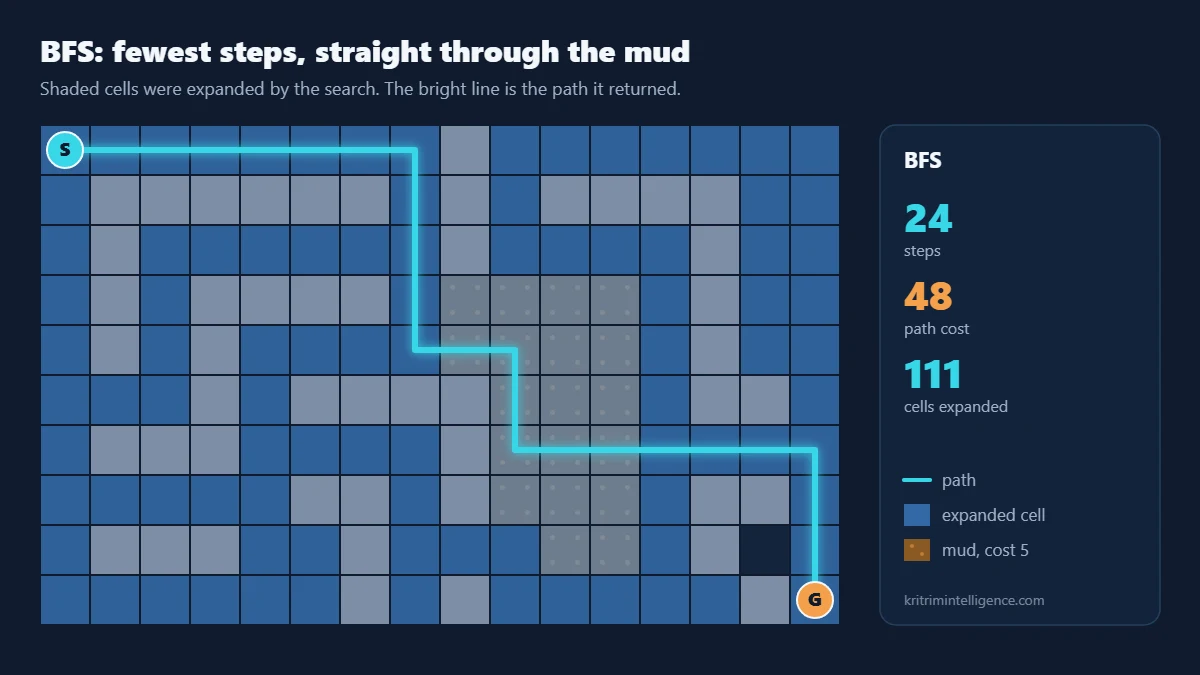
steps: 24   cost: 48   cells expanded: 111
S*******#.......
.######*#.####..
.#.....*#....#..
.#.####*~~~~.#..
.#.#...***~~.#..
...#.####*~~.##.
.###....#*******
.....##.#~~~.##*
.###..#...~~.#.*
......#.#.....#G
BFS reached the goal in 24 steps, and no path on this map is shorter. To find it, the search took 111 cells out of the queue, which is every one of the 112 open cells except one. On a map this size that is no problem at all.
Now look at where the path goes. It cuts straight through the middle of the mud. Six of its 24 cells are mud, each costing 5 to enter, so the total cost of the trip is 48. BFS did exactly what it promised: fewest steps. It simply has no idea that some steps are harder than others.
Where BFS falls short: weighted maps
Real robots care about more than step count. Mud drains the battery, a steep ramp slows a wheeled base, a narrow gap near a wall raises the risk of a scrape, and a busy aisle in a warehouse is a poor choice when there is a quiet one nearby. Planners express all of this as a cost on each move.
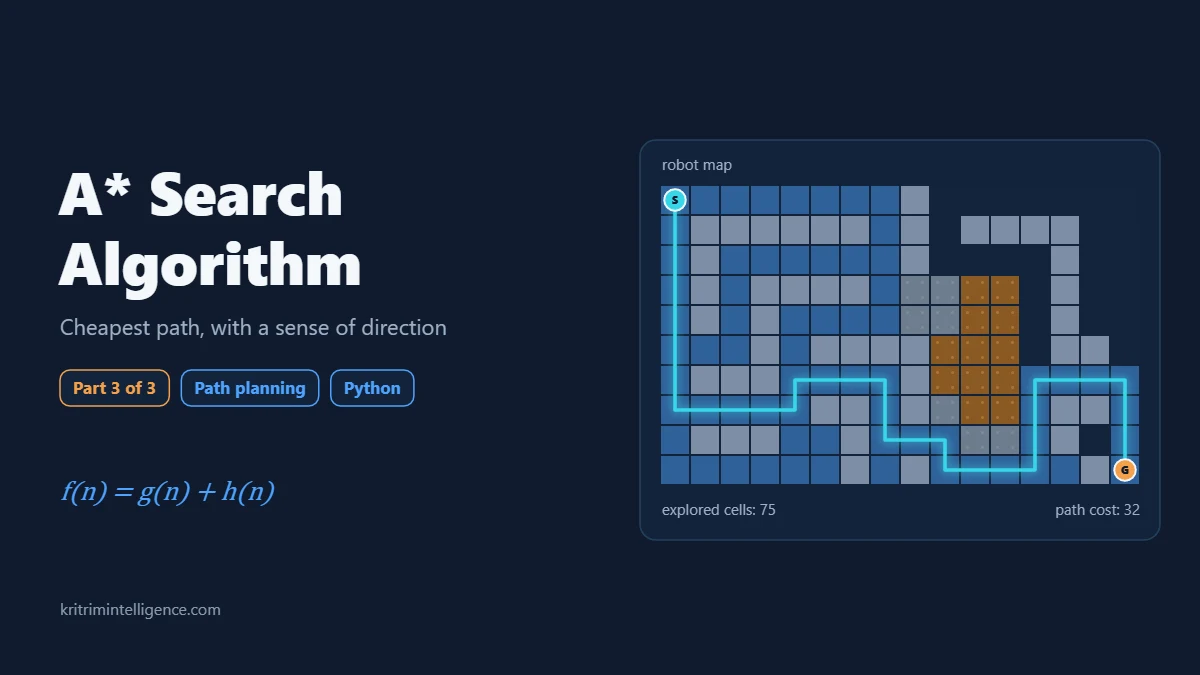
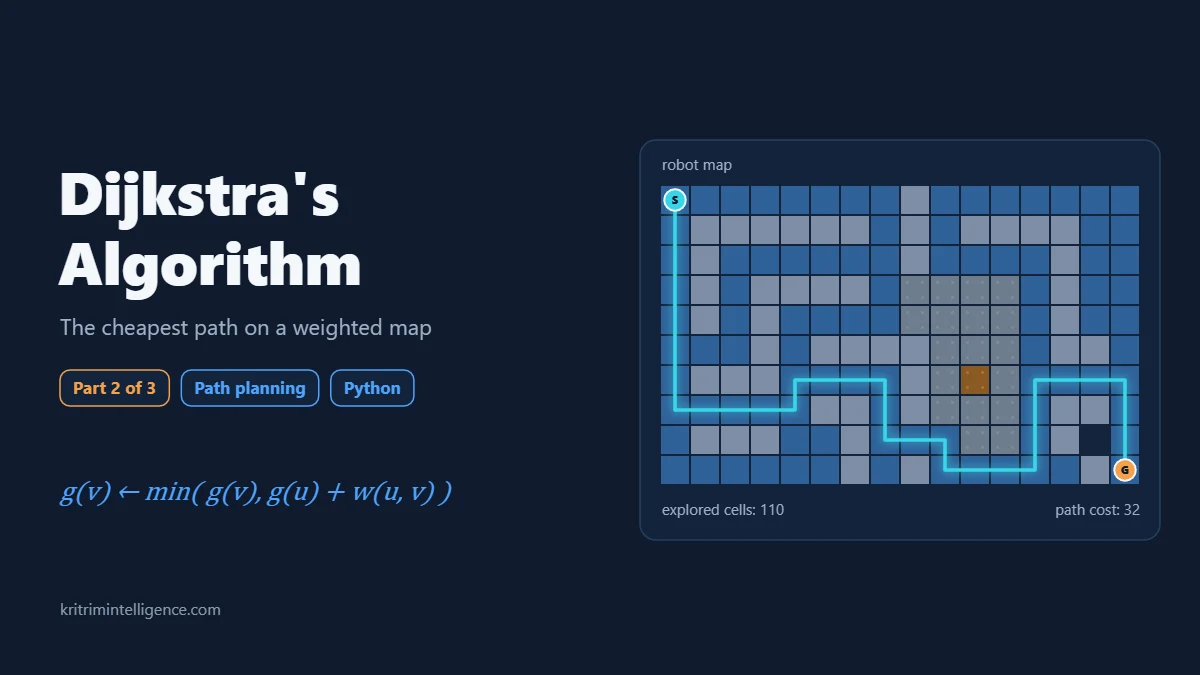
BFS cannot use those costs. Its guarantee only holds when every move costs the same. On our map there is a route around the mud that takes 32 steps but costs only 32, a third cheaper than the BFS path. To find it, the search has to expand cells in order of total cost, not in order of step count.
That change is exactly what Dijkstra’s algorithm makes, and it is the subject of the next post in this series. After that, A* adds a sense of direction so the search stops wasting effort on cells that lead away from the goal.
BFS beyond path planning
Even with that limit, BFS turns up in a surprising number of places in robotics and beyond:
- Frontier exploration. A robot mapping an unknown building uses BFS on its partial map to find the nearest boundary between known and unknown space, then drives there to look.
- Flood fill. Painting all connected free cells, finding rooms on an occupancy grid and checking whether the goal is reachable at all are all BFS.
- Distance maps. Running BFS from every obstacle at once gives the distance from each free cell to the nearest wall, which planners use to keep a safe margin.
- Unweighted graphs in general. Shortest chains in social networks, the fewest moves to solve a puzzle and web crawlers that stay a few links from a starting page all rely on BFS.
Frequently asked questions
What is breadth first search in simple terms?
Breadth first search explores a graph in layers. It visits everything one step from the start, then everything two steps away, and so on, using a first in, first out queue. The first time it reaches the goal, it has found a path with the fewest steps.
Does BFS always find the shortest path?
BFS always finds the path with the fewest edges or steps. If moves have different costs, the path with the fewest steps may not be the cheapest one, and you need Dijkstra’s algorithm or A* instead.
What is the running time of BFS?
BFS runs in O(V + E) time, where V is the number of nodes and E is the number of edges. Every node is queued at most once and every edge is checked a fixed number of times.
What is the difference between BFS and DFS?
BFS uses a queue and explores layer by layer, so it finds the fewest steps path. Depth first search uses a stack and follows one branch as deep as it can before backing up. DFS uses less memory on wide graphs but gives no shortest path guarantee.
Why is BFS used in robot path planning?
BFS is simple, fast on grid maps and guaranteed to find the fewest steps path. It is used for frontier exploration, reachability checks and distance maps, and it is the starting point for Dijkstra and A*.
Closing thoughts
BFS is the honest baseline of path planning. It looks everywhere, in order, and it never misses the shortest route in steps. When every move costs the same, it is hard to beat.
The mud on our map shows its blind spot. A planner that only counts steps will happily send a robot through the worst ground on the floor. In the next post we keep the same map and the same code style, swap the queue for a priority queue, and watch Dijkstra’s algorithm find the cheaper route around the mud.
If you have used BFS in your own robot projects, I would like to hear what you used it for.
References
- T. H. Cormen, C. E. Leiserson, R. L. Rivest and C. Stein, Introduction to Algorithms, 4th edition, MIT Press, 2022. Chapter on elementary graph algorithms.
- S. M. LaValle, Planning Algorithms, Cambridge University Press, 2006. Free online: https://lavalle.pl/planning/
- E. F. Moore, The shortest path through a maze, Proceedings of the International Symposium on the Theory of Switching, 1959.
- B. Yamauchi, A frontier based approach for autonomous exploration, IEEE CIRA, 1997.
- Python documentation, collections.deque: https://docs.python.org/3/library/collections.html#collections.deque