Tactile Sensing for Robots Explained: Teaching Robot Hands to Feel, with Python Code
Tactile sensing for robots explained: the four sensor types, why raw touch data fails, and how LingBot-Touch lifts success to 70%, with Python code.
Pick up an egg with your eyes closed and you will still hold it gently. Pick it up with numb fingers and you will probably drop it or crack it. Your hand does this with touch: it feels the first hint of slip and squeezes just enough.
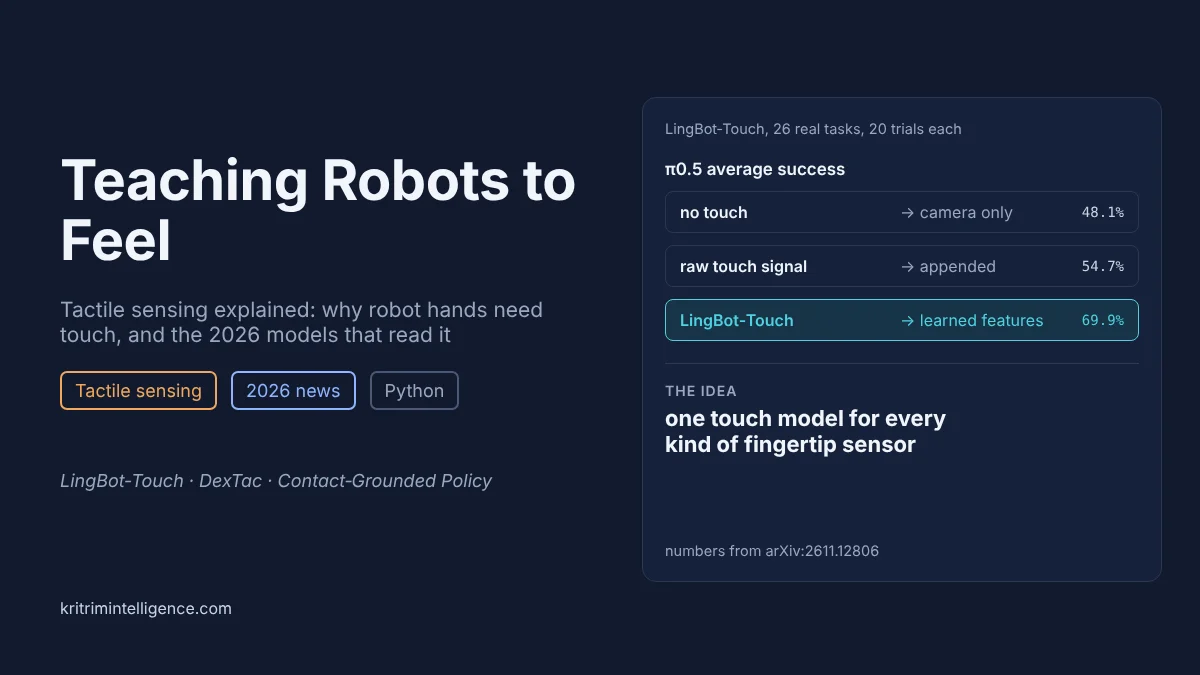
Most robot hands today work with numb fingers. They see the world through cameras, and when the fingers close around an object, the camera loses sight of the very contact that matters. On November 9, 2026, a team posted LingBot-Touch, a model that learns one shared language of touch from 4,983 hours of data across three different kinds of sensors. Plugged into π0.5, it raised average success on 26 real robot tasks from 48.1% to 69.9%. It is the most upvoted robotics paper on Hugging Face's trending list this week.
This post explains how robots sense touch, why the data is so hard to use, what LingBot-Touch does about it, and where touch still falls short. A short Python example shows the main trap: a touch signal helps a lot when it is clean, and can make things worse when it is not.
What this guide covers
- Tactile sensing at a glance
- Why cameras are not enough
- Four kinds of robot touch sensors
- The problem: every sensor speaks its own language
- LingBot-Touch: one model for many sensors
- Other 2026 work on robot touch
- A Python example: holding an unknown object
- Where touch still falls short
- Frequently asked questions
- Closing thoughts
Tactile sensing at a glance
| What it is | Sensors in a robot's fingers that measure pressure, contact location and slip |
| Why it matters | Fingers hide the contact from the camera, and slip, grip force and friction cannot be seen |
| The main problem | Every sensor type produces a different signal, so models trained on one rarely work on another |
| In the news | LingBot-Touch (November 9, 2026), a tactile foundation model for three sensor types |
| The headline number | π0.5 on 26 real tasks: 48.1% with no touch, 54.7% with raw touch, 69.9% with LingBot-Touch features |
| Our Python result | Camera only 69%. Clean touch 77%, perfect touch 93%, noisy touch 40% |
Why cameras are not enough
Modern robot policies, from diffusion policies to vision language action (VLA) models, learn mostly from camera images. That works well for moving objects from place to place. It works badly for three kinds of tasks:
- Tight fits. Pushing a key into a lock or a plug into a socket depends on tiny side forces and tilts that a camera cannot see.
- Soft or fragile objects. Squeezing toothpaste out of a tube or holding a paper cup needs a sense of how hard you are pressing.
- Anything inside the hand. Once the fingers close, they block the view of the contact. Opening a resealable bag or rolling a pen between fingers happens almost entirely out of sight.
The camera cannot tell how slippery a surface is either. A wet glass and a dry glass look the same, but the wet one needs a firmer grip. Touch reports all of this directly, at the moment it happens.
Four kinds of robot touch sensors
| Type | How it works | Good at | Weak at |
|---|---|---|---|
| Piezoresistive | A material whose electrical resistance drops when pressed | Cheap, thin, easy to cover a glove or skin | Coarse, drifts over time |
| Capacitive | Two layers with a gap; pressing shrinks the gap | Sensitive, the same idea as a phone screen | Picks up electrical noise |
| Magnetic | A small magnet in soft skin; a chip reads how far it moves | Measures sideways force (shear), tough | Upset by nearby metal and magnets |
| Visuotactile | A camera films a soft gel from behind as it deforms | Very detailed, shows shape and slip | Bulky, slower, gel wears out |
Each type gives a completely different kind of signal. A piezoresistive glove gives a grid of pressure numbers, a magnetic sensor gives three field readings per spot, and a visuotactile sensor gives a video. That difference is the heart of the problem.
The problem: every sensor speaks its own language
Vision models got good by training on huge, shared collections of images. Touch has never had that. Each lab buys a different sensor, records its own data, and trains a model that only reads that sensor. Swap the fingertip and the model has to start again.
Adding raw touch signals to a policy does not fix this. The policy has to learn sensor physics, contact and the task all at once, from a few hundred demonstrations. An Analog Devices article from August 2026 on insertion tasks put it plainly: naive fusion of camera and touch data often helped little, or hurt.
LingBot-Touch: one model for many sensors
LingBot-Touch tries to do for touch what large pretrained models did for images. Its key ideas:
- One coordinate system for every hand. Each sensing point, or taxel, is placed in a shared 3D frame on its finger. A token says which finger, where on it and when, not which wire on which sensor.
- Small tokenizers per sensor, one shared model. Each sensor type gets its own front end, and all of them feed one shared transformer.
- Learning by filling in gaps. Training hides 40% to 80% of the taxels and asks the model to predict the missing parts. It predicts learned features, not raw readings, so it focuses on what matters about the contact instead of sensor noise. The authors call this Tactile-JEPA.
- Lots of data, mostly from people. 4,983 hours, 464,431 episodes and about 1.33 billion frames across 24 task categories. About two thirds came from people wearing tactile gloves, the touch version of the human video data now used for robot vision.
To use it, the pretrained encoder is frozen and its features are passed to the policy as an extra input. It adds just 0.13% to LingBot-VLA's size.
The results
The team tested 26 real tasks, 20 on a Sharpa Wave hand and 6 on an XHand1, with 20 trials per task:
| Policy | No touch | Raw touch added | LingBot-Touch features |
|---|---|---|---|
| LingBot-VLA | 48.3% | 56.5% | 73.1% |
| π0.5 | 48.1% | 54.7% | 69.9% |
Raw touch helped a little. Learned touch features helped about three times as much. Across 104 combinations of task and policy, LingBot-Touch beat raw touch in 95.
The model even worked on a magnetic sensor it had never seen in training. Reading where a contact was, it was off by 0.16 mm on average, against 5.89 mm for an earlier tactile model, FTP-1. Its force estimates were off by 1.32 N against 3.72 N. The authors note this comparison is not perfectly fair, since FTP-1 used a trained adapter and LingBot-Touch did not.
Other 2026 work on robot touch
- DexTac (January 2026) records touch while a person physically guides the robot hand, then trains a policy on it. On a delicate task, injecting with a syringe, it succeeded 91.67% of the time and beat a force only version by 31.67 points on small syringes.
- Contact-Grounded Policy (March 2026) predicts not just where the hand should move but what it should feel next, then uses a compliant controller to make that happen. It was tested on a four fingered Allegro hand with Digit360 fingertip sensors and beat camera only and touch based diffusion policy baselines.
- Insertion with a balanced grip (August 2026). In Analog Devices' simulated tests, a transformer that mixes a wrist camera with fingertip touch reached 96.59% insertion success, against 92.97% for naive fusion, while running at 153 frames per second.
A Python example: holding an unknown object
Here is the simplest touch skill there is: hold an unknown object without dropping or crushing it. Each object gets a random weight, a random surface from slippery to grippy, and a random force at which it breaks.
Physics sets the minimum grip. With two fingers, the friction must hold the weight, so the grip force must be at least m g / (2 μ), where μ is the friction. Too little and the object slides out. Too much and it cracks.
We compare two ways to choose the grip:
- camera only: guess the weight from the object's size (with about 40% error), assume an average surface, add a 50% safety margin, and squeeze that hard
- touch: start gently, lift, and every 10 ms check the fingertips for slip. If it slips, squeeze 25% harder. If not, relax by 1%, the way your own hand settles on the lightest grip that works
The touch sensor is not perfect: some readings are wrong, either a missed slip or a false alarm. We try different error rates.
import numpy as np

# A two finger gripper lifts unknown objects: a paper cup, a soap bar, an egg.
# It must squeeze hard enough that the object does not slip out,
# but not so hard that it crushes it.
#   needed force   = m * g / (2 * mu)      (two fingers, friction mu)
#   crush force    = how hard the object can be squeezed before it breaks
G, DT = 9.81, 0.01                        # gravity, 100 Hz control


def make_object(rng):
    m = rng.uniform(0.05, 0.40)           # mass in kg
    mu = rng.uniform(0.25, 0.90)          # friction: slippery to grippy
    crush = rng.uniform(3.0, 12.0)        # newtons before it breaks
    return m, mu, crush


def camera_only(m, mu, crush, rng, noise=None):
    # the camera guesses mass from size (about 40% error) and cannot see
    # friction, so it assumes an average surface and adds a 50% margin
    m_est = m * rng.lognormal(0, 0.4)
    force = 1.5 * m_est * G / (2 * 0.5)
    needed = m * G / (2 * mu)
    return needed <= force < crush


def with_touch(m, mu, crush, rng, noise):
    # start gentle and lift; the fingertip sensors report slip.
    # noise = how often a slip reading is wrong (missed or false alarm)
    needed = m * G / (2 * mu)
    force, slid = 1.0, 0.0      # touch says when contact starts
    for _ in range(100):                  # one second of lifting
        if force >= crush:
            return False                  # crushed it
        slipping = force < needed
        if slipping:
            slid += (needed - force) / needed * 0.002   # metres slid this step
        sensed = slipping if rng.random() > noise else not slipping
        if sensed:
            force *= 1.25                 # slip felt: squeeze harder
        else:
            force *= 0.99                 # no slip: relax a little, like a hand
        if slid > 0.01:
            return False                  # slid 1 cm: dropped
    return True                       # held for a second, nothing broke


rng = np.random.default_rng(0)
N = 20000
objs = [make_object(rng) for _ in range(N)]
print(f"{'policy':>26} {'success':>8}")
for name, fn, noise in [("camera only", camera_only, None),
                        ("touch, noisy (10% wrong)", with_touch, 0.10),
                        ("touch, clean (5% wrong)", with_touch, 0.05),
                        ("touch, perfect", with_touch, 0.0)]:
    s = np.mean([fn(*o, rng, noise) for o in objs])
    print(f"{name:>26} {s:>8.1%}")
Running it prints:
                    policy  success
               camera only    69.0%
  touch, noisy (10% wrong)    39.6%
   touch, clean (5% wrong)    77.4%
            touch, perfect    93.4%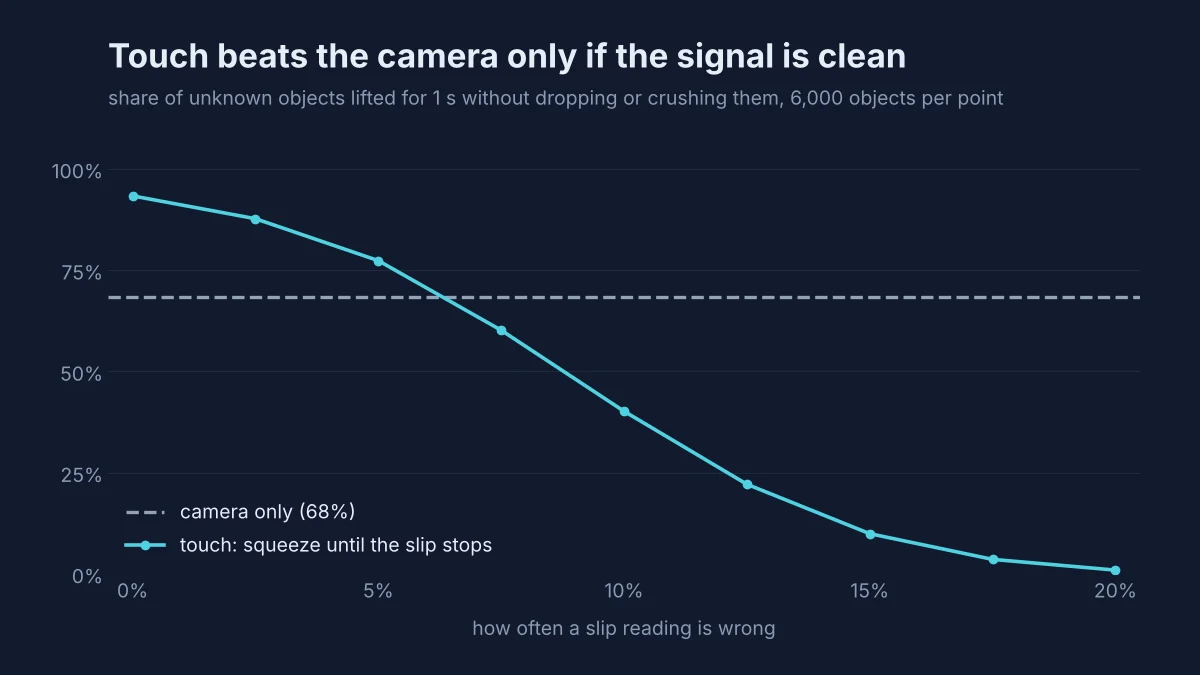
Clean touch wins clearly. With perfect slip sensing, the robot holds 93.4% of objects against 69.0% for the camera. It does not need to know the weight or the friction. It feels them.
Noisy touch loses. At 10% wrong readings, success falls to 39.6%, well below the camera. False alarms are the problem: each one makes the hand squeeze 25% harder, while a correct "no slip" relaxes it only 1%. Over a second of lifting, the grip creeps up until the object breaks.
The crossover is around 6%. Below that error rate, touch beats the camera. Above it, the camera wins. This is a toy, but it mirrors the LingBot-Touch result: the value of touch depends on how well the signal is read, not just on having a sensor.
A real controller would filter the readings over several steps, which is exactly the job a learned touch model does at a much larger scale.
Where touch still falls short
- Fingertips only. LingBot-Touch's data and geometry focus on fingertips, so contact with the palm or the side of a finger is barely covered.
- Not every sensor yet. Capacitive sensors were not included, and only two robot hands were tested.
- Sharing has a cost. With the same 1,000 hours of data, a model trained on one sensor beat the shared model on its own sensor in 7 of 8 cases, mostly in pinpointing where contact happened. One model for everything trades some precision for reuse.
- Not every task gains. In 9 of 104 task and policy pairs, LingBot-Touch did worse than raw touch.
- Hardware is still fragile and costly. Gels wear out, magnetic sensors pick up stray fields, and covering a whole hand with sensors remains expensive.
For the bigger picture of where robot learning is going, our posts on agentic robotics, VLA inference latency and imitation learning cover the other pieces.
Frequently asked questions
What is tactile sensing in robotics?
Tactile sensing gives a robot a sense of touch. Sensors in the fingertips or the skin of the hand measure pressure, where contact happens and whether an object is starting to slip. The robot uses that signal to grip things firmly without crushing them and to do tasks a camera cannot see, like pushing a key into a lock.
What types of tactile sensors do robots use?
The four common types are piezoresistive (a material whose electrical resistance changes under pressure), capacitive (a gap between two layers that shrinks when pressed), magnetic (a magnet in soft skin that moves under load) and visuotactile (a tiny camera that films a soft gel from behind as it deforms).
What is LingBot-Touch?
LingBot-Touch is a tactile foundation model posted on arXiv on November 9, 2026. It turns signals from piezoresistive, magnetic and visuotactile sensors into one shared representation. It was trained on 4,983 hours of touch data, and adding its features raised π0.5's average success on 26 real tasks from 48.1% to 69.9%.
Do robots need touch if they have good cameras?
For many pick and place tasks, cameras are enough. For tight fits, soft or fragile objects and anything hidden inside the hand, touch helps a lot. Fingers block the camera's view at the exact moment of contact, and slip, grip force and friction are not visible in an image.
Why can raw touch data make a robot worse?
Raw touch signals are noisy, differ from sensor to sensor and are hard for a policy to read. In LingBot-Touch's tests, simply adding raw touch to π0.5 gave a small gain, while learned features gave a much larger one. Our Python example shows the same effect: a slip signal that is wrong 10% of the time does worse than no touch at all.
Closing thoughts
Robot vision took off once there was a shared way to learn from huge image collections. Touch is starting down the same road. LingBot-Touch shows that one model can read very different sensors, that most of its training data can come from people wearing gloves, and that the learned features help far more than raw signals.
The lesson from both the paper and our toy example is the same. A touch sensor is only as useful as the model reading it. Clean touch, read by a good model, turns a clumsy grip into a careful one. Noisy touch can be worse than none.
If you run the example, try changing how fast the grip relaxes, or average the slip reading over three steps, and see how far right you can push the crossover point. We would like to hear what you find.
References
- B. Han, Y. Peng and others, Learning Heterogeneous Tactile Representation for General Dexterous Manipulation, November 2026. arXiv:2611.12806
- X. Zhang, C. Zhang and others, DexTac: Learning Contact-aware Visuotactile Policies via Hand-by-hand Teaching, January 2026. arXiv:2601.21474
- Z. Xu, Y. Wang and others, Contact-Grounded Policy: Dexterous Visuotactile Policy with Generative Contact Grounding, March 2026. arXiv:2603.05687
- Y. Zukerman, Teaching Robots to Feel, Analog Devices, August 2026. analog.com
- Hugging Face, trending papers, November 2026. huggingface.co